
Steam Deck Comprehensive Review: Portable PC Gaming Power
Is the Steam Deck worth your investment as a handheld gaming PC? In our comprehensive review, we dive into the Steam Deck’s performance, game library, and unique features, as a Steam machine without the fluff. Find out if this device stands out in the crowded field of portable gaming.
Key Takeaways
- The Steam Deck delivers exceptional portable PC gaming with advanced hardware such as 16GB RAM and up to 1TB NVMe SSD storage, combined with a powerful custom APU for high-end performance.
- Gamers can enjoy a superior visual experience with both LCD and OLED display options, the latter offering better color, contrast, longer battery life, and a larger diagonal screen size.
- SteamOS 3 enhances the Deck’s appeal with a stable gaming platform, compatibility with a vast range of games through Proton, and user-friendly interface, complemented by excellent battery life and power management.
Disclaimer: The links provided herein are affiliate links. If you choose to use them, I may earn a commission from the platform owner, at no extra cost to you. This helps support my work and allows me to continue to provide valuable content. Thank you!
The Powerhouse of Portable Gaming
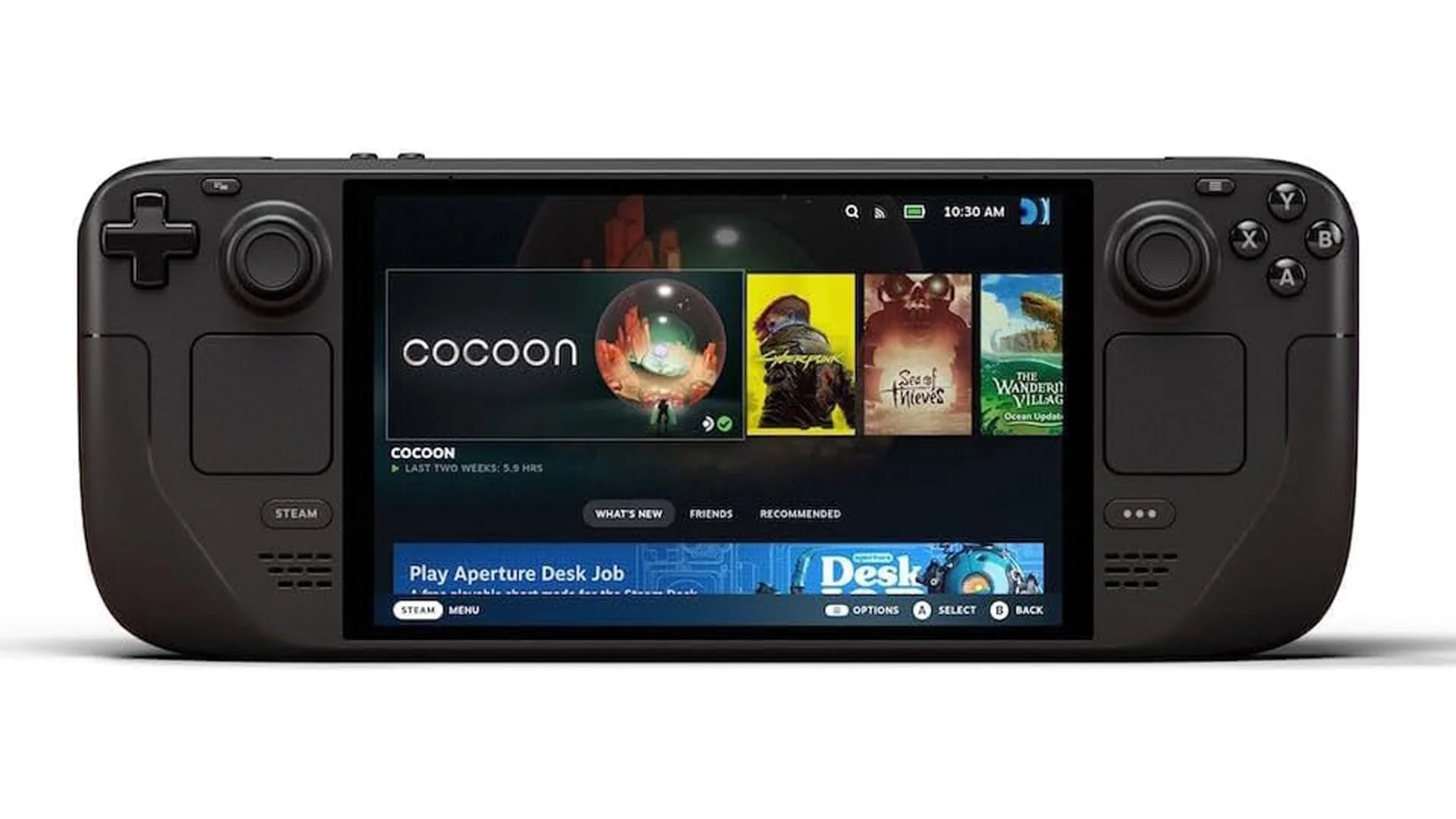
The Steam Deck is not just another handheld console—it’s a handheld gaming PC gaming with gamepad controls unleashed. With specs that rival many desktops, it’s no surprise that the Steam Deck is turning heads in the gaming community. Its advanced hardware, exemplified by the generous 16 GB LPDDR5 RAM and the choice between a 512GB or a 1TB NVMe SSD, makes it a formidable contender in the realm of portable devices.
But what really sets the Deck apart is its superior performance, even when placed beside heavy hitters like the Nintendo Switch. The raw power it brings to playing games on the move is simply unmatched.
Efficient AMD APU
The efficient custom APU from AMD lies at the core of the Steam Deck’s superior performance, and internal components are a synergistic combination of a quad-core CPU and an RDNA 2 GPU. This powerhouse is capable of reaching clock speeds up to 3.5GHz for the CPU and 1.6GHz for the GPU, ensuring that pc gaming on the Steam Deck is a smooth, visually stunning experience.
This system is engineered to deliver more than enough performance for contemporary games, balancing power usage and heat generation effectively. The result is amazing motion rendition and game running performance that feels both fluid and responsive.
NVMe SSD Storage
The Steam Deck’s NVMe SSD storage revolutionizes gaming, where speed is of utmost importance. Load times are lightning-fast, and system responsiveness is second to none, thanks to the high-speed storage capable of up to 3000MB/s sequential read speeds. NVMe SSDs are a leap forward from the eMMC storage found in other handhelds, providing a significant boost in both read and write speeds.
This means games not only load quickly but also run smoothly, and with storage options up to 512GB, there’s ample room in your steam library for a plethora of titles, including the master chief collection, to download games.
Display Options: LCD vs OLED

When it comes to display technology, the Steam Deck doesn’t hold back. With both LCD and OLED versions available, gamers can choose the visual experience that suits them best. The OLED model, in particular, stands out for its lighter weight and enhanced visuals, offering a superior color gamut, better viewing angles, and deeper blacks compared to the standard LCD model.
Not to mention, the OLED Steam Deck boasts improved battery life, offering 30-50% more juice than its LCD counterpart, ensuring that you can play steam deck oled games for longer.
You can see a general review about LED vs LCD here:
OLED vs LED LCD: what’s the best display tech?
Diagonal Display Size
The Steam Deck offers a 7-inch screen size, acknowledging the critical role of diagonal display size in enhancing the gaming experience. on the standard model and an upgraded 7.4-inch screen on the OLED version. Both offer a 1280 x 800 resolution, ensuring that games look crisp and that the larger picture on the OLED screen doesn’t compromise on image quality.
Plus, with touch-enabled displays, navigating menus and interacting with games is intuitive and fluid.
Brighter Colors and Pure Blacks
The OLED display excels in providing a top-notch visual experience. Brighter colors and pure blacks provide striking contrast and brilliant clarity, bringing games to new light.
With a wide color gamut that covers 110 percent of DCI-P3 and support for HDR, the OLED screen makes every game pop with vibrant, dynamic visuals that are bound to captivate any gamer.
Steam Deck Operating System: SteamOS 3

Beyond hardware, the Steam Deck demonstrates remarkable competence through its operating system, the SteamOS 3. Based on Arch Linux and featuring the KDE Plasma 5 desktop environment, SteamOS 3 offers a secure and stable platform with an exclusive startup movie tailored for gaming. Rolling updates keep the system fresh and responsive, while an immutable file system, except for the user’s home directory, ensures a robust gaming and computing experience.
Additionally, the inclusion of Gamescope, a microcompositor, boosts gaming performance on the Steam Deck, and users can enjoy a full desktop experience with the KDE Plasma 5 desktop environment.
Game Compatibility
The Steam Deck shines in its game compatibility handling a vast array of steam games, thanks to Proton, a compatibility layer that enables Windows-based games to run seamlessly on the Linux-powered device. Games like the Skyrim Special Edition and Forza Horizon work very well on the platform.
This means that even titles like Hitman 3 and Doom Eternal not only work on the Deck but can also show enhanced performance compared to their Windows counterparts.
User-Friendly Interface
The user interface of the Steam Deck contributes significantly to its appeal. The operating system’s interface is a familiar extension of the desktop version of Steam, complete with indicators for battery life and wireless connectivity. Moreover, controller support is fully integrated, providing a console-like user experience that’s accessible even when you’re on the move.
Battery Life and Power Management

The Steam Deck excels in one of the main areas of concern for any portable device - power efficiency and battery life. On average, users can expect around 6 hours of gameplay, which can extend up to seven or eight hours for lighter activities like web browsing or playing less demanding games. Furthermore, simple tweaks, such as reducing the screen frame rate to 30 FPS or lowering in-game resolution, can significantly enhance the battery duration without dramatically altering the gaming experience.
Bigger Battery
The OLED model of the Steam Deck offers the following improvements:
- A larger 50Wh battery, providing a substantial increase in battery capacity and playtime compared to the original model’s 40Wh battery
- Users can enjoy their favorite games for 30-50% longer
- Perfect for long flights or extended gaming sessions without the need for a power supply.
Adjustable Performance Profiles
With customizable performance profiles and performance tuning, the Steam Deck enables users to tailor their gaming experience. These settings allow gamers to adjust the frame rate limit and other parameters, optimizing power consumption and performance for each individual game or globally across all titles.
The Battery Saver mode is a particularly useful feature, automatically adjusting settings to achieve better battery life while maintaining performance for less demanding games.
Expanding the Steam Library

The Original Steam Deck evolves to accommodate your expanding game library. Developers can take advantage of a game-specific API to ensure their titles run optimally on the device, making it a popular choice among steam decks.
And for those who want to carry a large collection of games, the option to use a 1TB SD card for additional storage is a welcome feature.
Downloading Games

The flexibility of the Steam Deck can also be seen in its game management capabilities. The ability to transfer installed games from a PC to the Steam Deck over a local network offers several benefits:
- Faster game downloads, as you don’t have to wait for the game to download again on the Steam Deck
- Less time waiting to play the latest AAA titles, as you can transfer them directly to the Steam Deck
- Saves your system’s bandwidth for other uses, as you’re not downloading the game again on your PC
This ingenious feature not only saves time but also improves your gaming experience, especially in games like Monster Hunter Rise.
Docking and Connectivity
Seamless Integration with Peripherals
The Steam Deck’s docking station is a game-changer for those who want to elevate their portable PC gaming experience. This docking station allows for seamless integration with a variety of peripherals, making it incredibly easy to connect to external displays, wired networking, USB peripherals, and power. Imagine transforming your Steam Deck into a desktop gaming PC—perfect for playing games on a larger screen or using a keyboard and mouse for a more immersive experience. Whether you’re at home or on the go, the docking station ensures that your gaming setup is always ready for action.
Expanding Functionality with Docking
The Steam Deck’s docking station doesn’t just stop at basic connectivity; it significantly expands the device’s functionality. By connecting to external displays, you can enjoy your favorite Steam games on a larger screen, bringing your gaming experience to a whole new level. The wired networking option provides a stable and fast internet connection, crucial for those intense multiplayer sessions. Additionally, the USB peripherals option allows you to connect your favorite gaming accessories, such as controllers, headsets, and keyboards, making the Steam Deck a versatile and powerful gaming hub. This expanded functionality ensures that your Steam library is always at your fingertips, ready to deliver an unparalleled gaming experience.
Gaming Performance
Frame Rates and Resolution
When it comes to gaming performance, the Steam Deck stands out as a powerhouse in the realm of portable PC gaming. Thanks to its custom APU, optimized specifically for handheld gaming, the Steam Deck is capable of delivering high frame rates and resolutions. This means you can run the latest AAA games at impressive frame rates and resolutions, providing a smooth and immersive gaming experience. Whether you’re diving into the fast-paced action of Monster Hunter Rise or reliving the epic battles in the Master Chief Collection, the Steam Deck ensures that every game runs flawlessly. Its ability to handle high frame rates and resolutions makes it an ideal device for gamers who demand top-tier performance on the go. With the Steam Deck, your Steam library is not just portable; it’s powerful.
Stable Online Play

Improved Wi-Fi connectivity in the OLED model provides:
- A smoother online play experience on the Steam Deck
- Lower latency for more responsive gameplay
- Increased bandwidth for data-intensive multiplayer matches
Whether you’re teaming up with friends or competing against rivals, the Steam Deck’s stable online gaming ensures you’re always in the game.
The Steam Deck Ecosystem: Community and Third-Party Support
Community and third-party support shape the rich and diverse gaming ecosystem of the Steam Deck. Customizable control inputs, including touchpads and triggers, cater to individual gaming preferences. Integrated Steam features like user profiles, cloud saving, and Remote Play enhance the connectedness of the platform.
And with the versatile dock unit, the Steam Deck can easily become part of an integrated gaming setup, allowing connections to external displays and power sources for an even more immersive experience.
You can also purchase a Limited edition carrying case with removable liner, Steam profile bundle.
Summary
Embarking on a journey with the Steam Deck reveals a portable gaming device that’s not just cutting-edge in terms of portable PC gaming but also a pioneer in creating a versatile, connected gaming ecosystem. From its powerful hardware to the vibrant OLED display, from the expansive Steam library to the supportive community, the Steam Deck stands as a testament to what the future of gaming looks like—unrestricted, dynamic, and always within reach.
Frequently Asked Questions
Can the Steam Deck run all Steam games?
Yes, the Steam Deck offers excellent game compatibility and can run most Windows-based games using Proton on SteamOS 3, and some games may even perform better than on Windows.
How does the OLED model of the Steam Deck improve battery life?
The OLED model of the Steam Deck improves battery life by featuring a larger 50Wh battery capacity, providing 30-50% longer battery life than the original model, allowing for extended gameplay sessions.
Can I customize the performance settings for each game on the Steam Deck?
Yes, you can customize the performance settings for each game on the Steam Deck, allowing for performance tuning to optimize power consumption and performance based on your preferences. Enjoy personalized gaming experiences!
Is it possible to expand the storage capacity of the Steam Deck?
Yes, you can expand the Steam Deck's storage using a MicroSD card, with storage expansion options available up to 1TB for a vast game library. Enjoy expanding your storage capacity and gaming options!
Does the Steam Deck support online multiplayer gaming?
Yes, the Steam Deck supports online gaming with improved Wi-Fi connectivity for a smooth and stable experience.
Related Gaming News
Steam Deck Unveils OLED Model, Release Date AnnouncedTop Steam Games of 2023: A Detailed List to the Year's Best
Useful Links
The Best Cloud Gaming Services: A Comprehensive GuideBest Steam Games of 2023, According to Google Search Traffic
Comprehensive Review For Handheld Gaming Consoles of 2023
Nintendo Switch - News, Updates, and Information
Top Gaming PC Builds: Mastering the Hardware Game in 2024
Top New Consoles of 2024: Which Should You Play Next?
Author Details

Mazen (Mithrie) Turkmani
I have been creating gaming content since August 2013, and went full-time in 2018. Since then, I have published hundreds of gaming news videos and articles. I have had a passion for gaming for more than 30 years!
Ownership and Funding
Mithrie.com is a Gaming News website owned and operated by Mazen Turkmani. I am an independent individual and not part of any company or entity.
Advertising
Mithrie.com does not have any advertising or sponsorships at this time for this website. The website may enable Google Adsense in the future. Mithrie.com is not affiliated with Google or any other news organization.
Use of Automated Content
Mithrie.com uses AI tools such as ChatGPT and Google Gemini to increase the length of articles for further readablity. The news itself is kept accurate by manual review from Mazen Turkmani.
News Selection and Presentation
The news stories on Mithrie.com are selected by me based on their relevance to the gaming community. I strive to present the news in a fair and unbiased manner.